Securing Windows Access: Eliminating Static Credentials and VPN Overreach with Boundary & Vault
Despite years of security advancements, many organizations still struggle with static credentials and overly broad network access in Windows environments. This Q&A explores how IBM Boundary and Vault can transform your approach by combining identity-based access control with dynamic secrets management. Learn why traditional VPNs fall short, what makes static credentials a persistent risk, and how to implement a modern, least-privilege model for Windows remote access.
Why are static credentials a persistent security problem in Windows environments?
Static credentials—such as shared local administrator accounts, long-lived domain accounts, and manually provisioned privileged passwords—remain a major vulnerability. In many organizations, these credentials are never automatically rotated and can stay valid for months or even years. This creates a high risk of exposure through phishing, credential dumping, or insider threats. Even with multi-factor authentication (MFA) in place, the underlying static password can be reused across sessions and machines, especially for Remote Desktop Protocol (RDP) access, troubleshooting, or break-glass scenarios. The lack of automation and manual rotation burden means these credentials often fall into the wrong hands. For CISO, DevOps, and security teams, this ongoing reliance on static secrets undermines overall security posture and compliance efforts.
How do VPNs contribute to overly broad network access in Windows environments?
Traditional VPNs follow a castle-and-moat model: they secure the perimeter but grant broad network-level access once inside. While a VPN ensures encrypted connectivity, it does not control access at the user-to-resource granularity. Organizations then rely on firewalls, security groups, and network segmentation—all based on IP addresses—to limit lateral movement. However, in modern cloud and hybrid environments, IP addresses are dynamic and ephemeral, making IP-based rules brittle and hard to manage. This leads to operational sprawl as additional tools are needed to enforce fine-grained access policies. The result is that users often gain more access than necessary, increasing the risk of credential theft and lateral movement across Windows servers and workstations.
What is the better model offered by Boundary and Vault for Windows access?
IBM Boundary fundamentally changes the access model by combining authentication and authorization into a single platform. Instead of granting broad network access, Boundary creates a direct connection between a user and a target resource based on the user's identity. This eliminates the need for VPNs and their associated IP-based restrictions. Vault complements Boundary by handling credentials dynamically—generating short-lived, just-in-time secrets for Windows machines. Together, they provide a zero-trust framework where access is granted per session, per user, and per resource. This model reduces credential exposure because static passwords are no longer shared or stored indefinitely. Administrators can enforce policies like MFA, session recording, and approval workflows, all while maintaining a clear audit trail.
How does Boundary handle credential exposure on Windows targets?
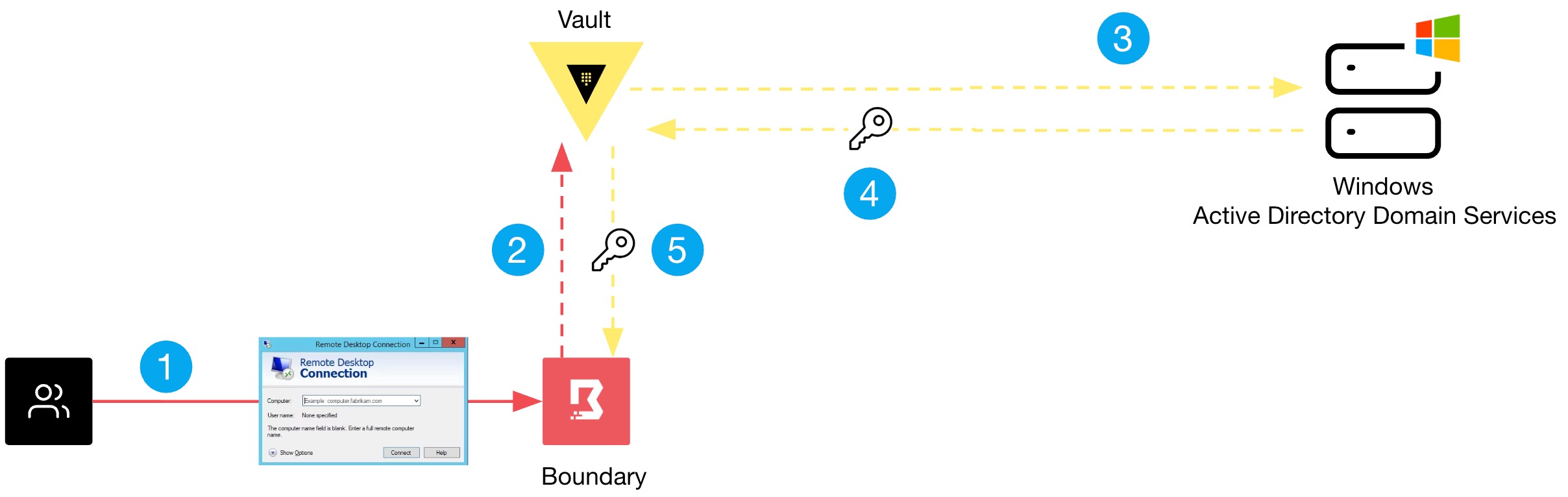
Boundary integrates with Vault to manage credentials on behalf of users. When a user requests access to a Windows target, Boundary authenticates the user's identity (often via SSO or MFA), then obtains a temporary credential from Vault—such as a one-time password or a short-lived domain account. This credential is injected into the RDP or SSH session automatically; the user never sees or handles the actual password. After the session ends, the credential is revoked or expires, eliminating the risk of reuse. This approach replaces shared static accounts with dynamic, identity-bound secrets. It also simplifies compliance by ensuring that every access event is logged with who accessed what, when, and for how long. The result: reduced lateral movement risk and no more standing privileged accounts.
What are the key steps to configure Boundary and Vault for Windows environments?
To test this solution, you need to set up both Boundary and Vault in your environment. First, install the Boundary controller and worker nodes, and configure identity providers (e.g., Okta, Azure AD) for authentication. Next, enable the Vault secrets engine for Windows—typically using the ad secrets engine to manage service accounts or the ssh engine for SSH-style access. Within Boundary, define a target for each Windows resource, linking it to a credential store backed by Vault. Create roles that grant access to specific targets per user or group. For Windows RDP access, set up a Boundary worker that can proxy the connection. Finally, test by having a user request access; they should receive a temporary credential automatically. Detailed step-by-step guides are available in official HashiCorp and IBM documentation.
How does this approach improve overall security posture?
By replacing static credentials with dynamic, per-session secrets and replacing broad VPN access with identity-based, resource-specific connections, organizations dramatically reduce their attack surface. There is no longer a standing password that can be stolen; each access is ephemeral and tightly scoped. Lateral movement becomes nearly impossible because connectivity is allowed only to the specific Windows machine the user is authorized to reach, not the entire subnet. Combined with MFA and session recording, every action is accountable. This model aligns with zero-trust principles: never trust, always verify. For Windows-heavy shops, it also simplifies management—no more manual password rotation, no more shared admin accounts. Security teams gain a clear audit trail, while users enjoy frictionless access. Overall, this solution addresses the two biggest Windows security pain points: credential exposure and overly permissive network access.
Related Articles
- 10 Key Facts About Russia's Router Hijacking Campaign to Steal OAuth Tokens
- How to Stay Productive When Ubuntu Services Are Under Attack
- Google Expands Binary Transparency to Android Apps: A New Shield Against Supply Chain Attacks
- npm Supply Chain Under Siege: Wormable Malware and CI/CD Persistence Emerge as Top Threats
- Securing Your npm Supply Chain: A Step-by-Step Guide to Mitigating Modern Threats
- German Police Unveil Real Name and Face of Notorious Russian Ransomware Kingpin 'UNKN'
- The Browser Blind Spot: Why Your DLP Fails to Catch Data Exfiltration in Modern Workflows
- BRICKSTORM Malware Targets VMware vSphere: Urgent Hardening Guide for Defenders