IBM Vault 2.0: Making Secrets Management More Intuitive and Transparent
IBM Vault 2.0 introduces a series of user-friendly enhancements designed to streamline onboarding and improve operational visibility. The update focuses on reducing the learning curve for new users while providing administrators with better insights into how secrets management, key lifecycle management, identity brokering, and data protection are used across the organization. By rethinking the user interface and adding reporting tools, Vault 2.0 aims to make secrets management more accessible and actionable for teams of all skill levels.
- What are the main UI enhancements in IBM Vault 2.0?
- How does the visual policy generator simplify permissions management?
- What is the onboarding wizard and how does it help new users?
- How has the navigation bar been improved in Vault 2.0?
- What improvements to reporting and visibility does Vault 2.0 offer?
- How does Vault 2.0 help customers discover and adopt new features?
What are the main UI enhancements in IBM Vault 2.0?
IBM Vault 2.0 introduces several UI enhancements aimed at making secrets management more intuitive. The visual policy generator provides a pre-filled form that generates policy snippets, reducing the need for manual coding. The onboarding wizard guides new users through simple questions to produce editable code snippets tailored to their use cases. Introductory pages for both new and existing features explain the value and offer quick-start actions. Finally, the navigation bar has been completely revamped, now grouping features by common customer problems rather than technical categories. These changes collectively lower the barrier to entry and help users accomplish tasks without deep product expertise.
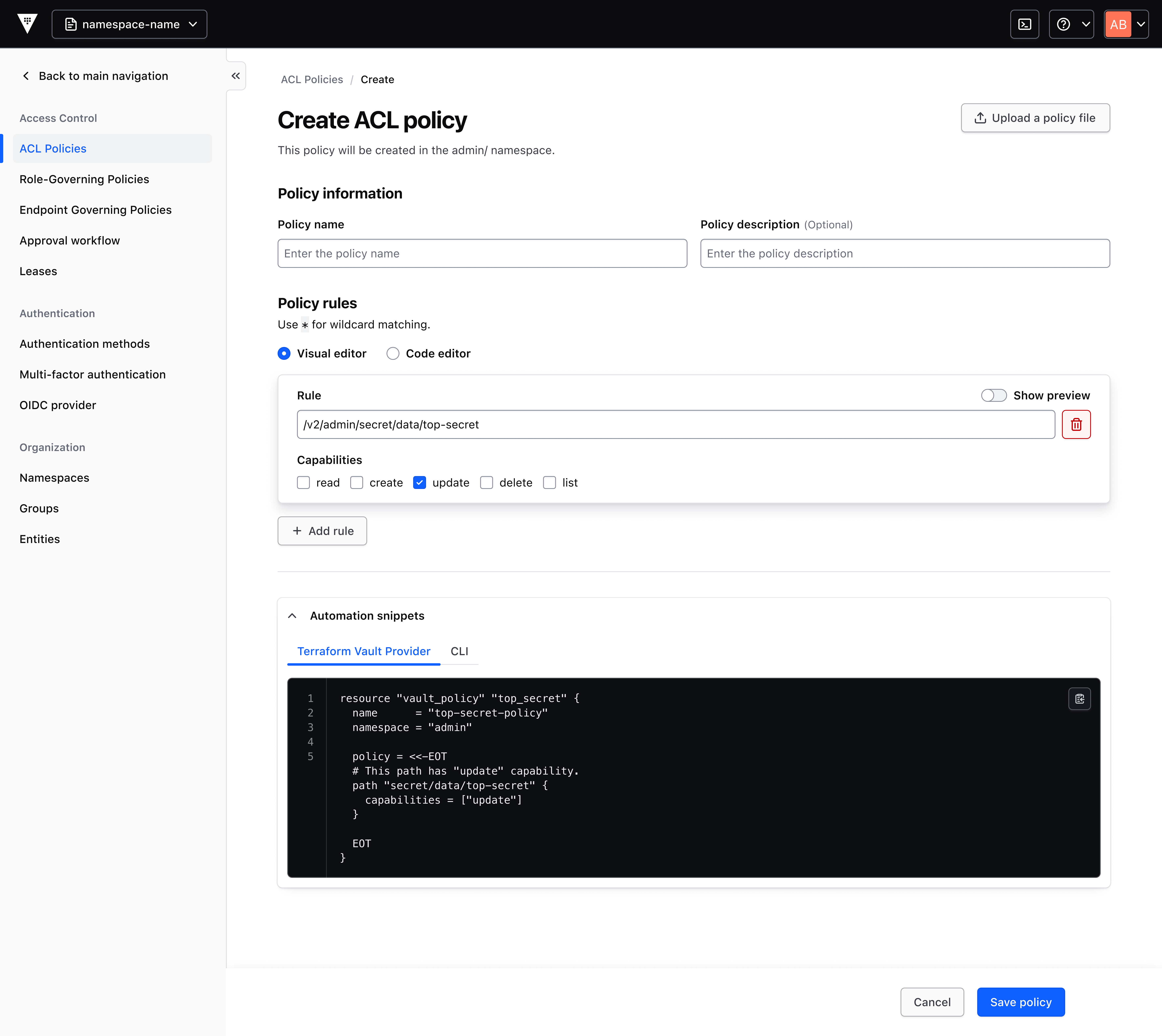
How does the visual policy generator simplify permissions management?
In earlier versions of Vault, new users started with no permissions and had to write custom policy code from scratch—a process that could be error-prone and time-consuming. The visual policy generator addresses this by offering a contextual form with pre-filled options. Users select the resources and actions they need, and the tool automatically generates a best-practices policy snippet. This snippet can be copied directly for use with the Terraform Vault Provider (the recommended approach) or saved to the Vault cluster. The generator not only speeds up policy creation but also ensures correctness and consistency, reducing the operational burden on administrators and accelerating feature adoption.
What is the onboarding wizard and how does it help new users?
The onboarding wizard is designed to replace complex documentation with an interactive experience. When a user encounters a feature for the first time, the wizard asks a series of straightforward questions about how they intend to use that feature—for example, the type of secrets they want to store or the authentication method they prefer. Based on these answers, the wizard dynamically generates an editable code snippet that reflects a recommended implementation. This approach allows users to quickly get functional code without needing to study Vault’s extensive documentation. The result is a faster, more confident onboarding process that emphasizes practical learning over theoretical knowledge.
How has the navigation bar been improved in Vault 2.0?
Previously, Vault’s navigation was organized around technical components, which required users to understand the product’s internal structure. In Vault 2.0, the navigation bar has been reorganized to focus on customer problems rather than product features. For instance, instead of having separate entries for “PKI” and “Transit,” the new menu groups options under tasks like “Encrypt Data” or “Manage Identities.” This problem-oriented layout helps users intuitively locate the features that match their immediate needs, reducing the time spent searching through menus. The revamp centers the user experience, making it easier for both beginners and experienced operators to navigate Vault’s capabilities.
What improvements to reporting and visibility does Vault 2.0 offer?
Vault 2.0 enhances reporting capabilities with better visibility into consumption patterns. Organizations can now track usage across key areas: secrets management, key lifecycle management, identity brokering, and data protection. The improved reporting dashboards provide granular data on how each service is utilized, including frequency of access, policy enforcement, and resource utilization. This transparency helps teams identify trends, support forecasting for capacity planning, and ensure compliance with governance policies. By making usage data more accessible, Vault 2.0 enables administrators to make informed decisions about resource allocation, optimize costs, and maintain operational oversight.
How does Vault 2.0 help customers discover and adopt new features?
Vault 2.0 tackles feature discovery through introductory pages that appear for both brand-new and existing capabilities. Each page explains the feature’s value proposition, provides context on when to use it, and offers a recommended quick-start action—such as running a sample command or using the visual policy generator. This in-product guidance reduces reliance on external documentation and community resources. Additionally, the onboarding wizard and navigation redesign work together to surface relevant features based on the user’s immediate tasks. The goal is to match features to customer problems intuitively, so users don’t need to be Vault experts to leverage advanced functionality.
Related Articles
- Boosting Literacy for English Learners: How One Ohio District Turned Pandemic Challenges into Progress
- NVIDIA CEO Jensen Huang to Graduates: Your Careers Begin at the Dawn of the AI Era
- LinkedIn Job Cuts: A Deeper Look at the Tech Industry’s Shifting Priorities
- Navigating Fedora Community Governance: Lessons from the AI Developer Desktop Initiative
- How to Implement Reinforcement Learning Using Divide and Conquer (Without TD Learning)
- Carbon Brief Launches Urgent Call for Summer Journalism Interns Amid Climate Reporting Surge
- How to Access and Use the Coursera Learning Agent in Microsoft 365 Copilot
- The Structural Flaws of Social Media: Why Fixing It Requires a Fundamental Redesign